deviant art

Deviant Login Shop
 Join deviantART for FREE Take the Tour
[x]
Download Image
PNG, 1271×4659
more ▶

More from ~Veradaine

Featured in Groups:

Details

February 2, 2012
4.3 MB
1271×4659
Sta.sh
Link
Thumb

Statistics

Comments: 68
Favourites: 1,154 [who?]

Views: 17,763 (6 today)
Downloads: 436 (0 today)
[x]
:iconveradaine:

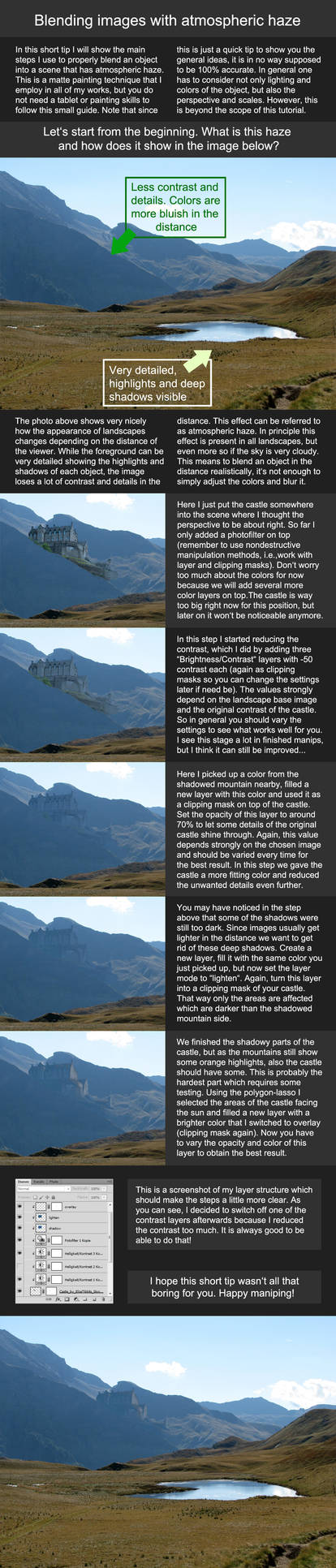
-Shadows and Glows-

A short tutorial for novice-intermediate manipulators

C o m m e n t s :
Well, someone asked for a tutorial, so here one is.
I know, I know, I'm just avoiding that hair tut like a boss. I:

/fails at drawing racoons

E D I T : Some people had mentioned that they had trouble viewing this, so I've converted the file into a PNG and made it available for download.
Thanks for the feedback, guys! Does it work for you now?

--~--~--

T i m e : 3 hours
T o o l s : Photoshop CS5 and a tablet

full view c:

--~--~--

C r e d i t s ;
(on the image.)

:iconatsd1::iconatsd2::iconatsd3:
Add a Comment:
 
love 1 1 joy 0 0 wow 1 1 mad 0 0 sad 0 0 fear 0 0 neutral 0 0
:iconfiamma-studios:
=Fiamma-Studios Jan 21, 2013  Hobbyist Digital Artist
Hello! I would love to add your tutorial as this weeks featured tutorial in :iconequinemasters:
I have already sent the request. Thanks for making an awesome tutorial! :hug:
Reply
:iconthecallybear:
=TheCallyBear Sep 9, 2012  Hobbyist General Artist
Would you be able to help me find the first background you used, the one with the blue flowers?
I've searched through the stock artists that you linked but I can't seem to find it. s:
thank-you!
Reply
:iconveradaine:
~Veradaine Sep 9, 2012  Hobbyist Digital Artist
Yeah sure, it's this one, except that's snow, not flowers.
<3
Reply
:iconthecallybear:
=TheCallyBear Sep 10, 2012  Hobbyist General Artist
Ohh thank-you very very much! c: Ahh my mistake, I couldn't quite make it out. x.x

thank-you once more <33
Reply
:iconveradaine:
~Veradaine Sep 11, 2012  Hobbyist Digital Artist
That's okay, it's no problem! :]
Reply
:iconlanakaii:
~Lanakaii Jul 21, 2012  Hobbyist General Artist
In the glow tutorial, what brush is that? I can't seem to find it...
Reply
:iconveradaine:
~Veradaine Jul 29, 2012  Hobbyist Digital Artist
it's actually just a normal hard brush. you have to go into brush settings-->transfer, and make the settings match with what is shown.
(:
Reply
:iconxxelanite:
~xxElanite Jul 22, 2012  Student Photographer
It's a plain basic hard brush with pressure sensitivity - the benefits of a tablet :3
Reply
:iconlanakaii:
~Lanakaii Jul 23, 2012  Hobbyist General Artist
Got it :D Thanks, I have a Wacom Create and can't wait to use this tutorial!
Reply
:iconxxelanite:
~xxElanite Jul 23, 2012  Student Photographer
nice ^^
Reply
Add a Comment: